
Free Market equipment stats, filters and sorting
Free Market equipment listings now show a stat line. Item pages let you filter shops by stat range and sort by price, recency or upgrades.
A stat line for every listing
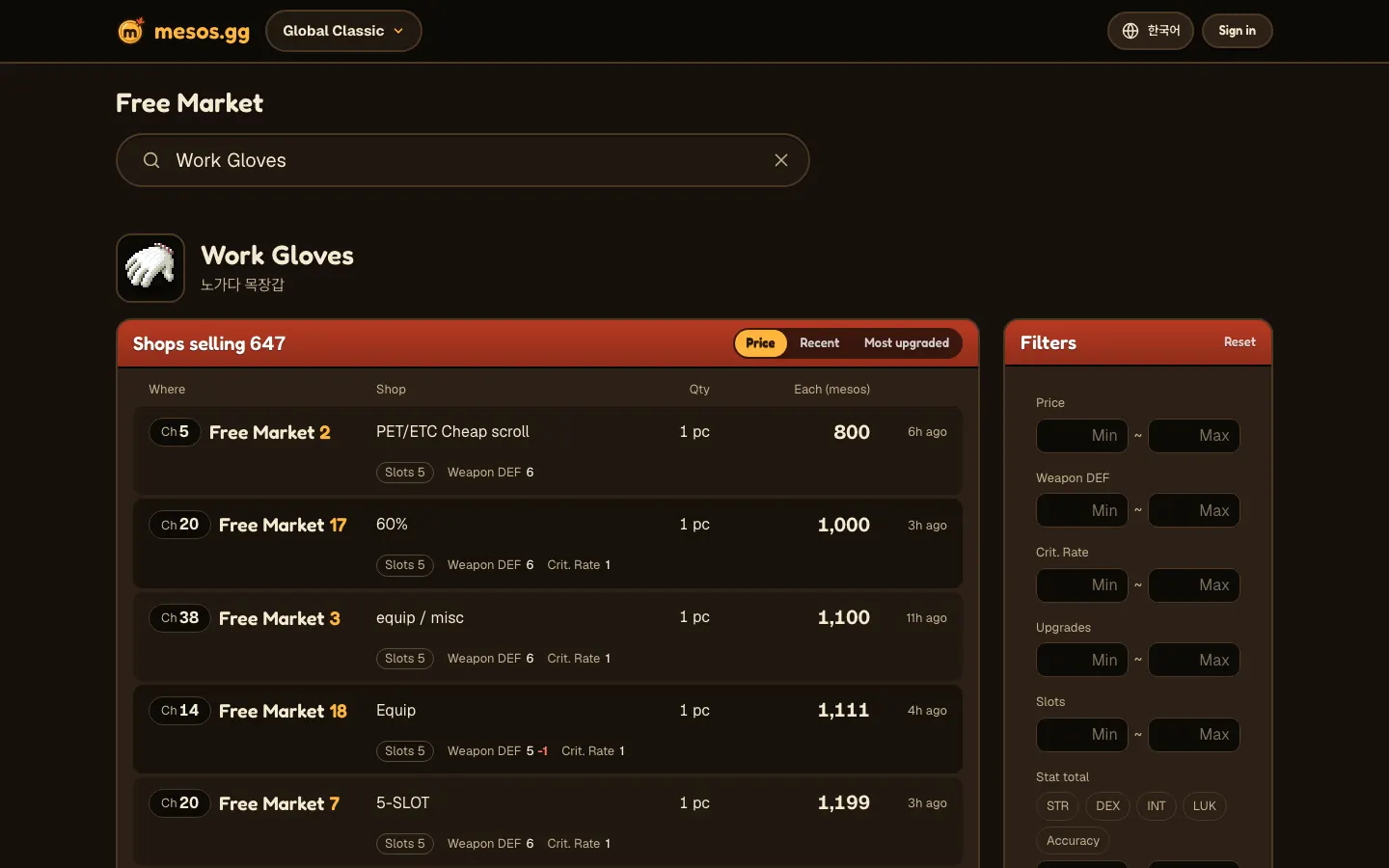
Item pages put the stat line under each shop row, and Free Market now on the home page puts it under the item name.
- The number in white is the listing's stat. When a gold +N follows it, that's how far above the item's base stat it is.
- If the item doesn't usually have that stat, the whole stat is in gold, as in Attack +10.
- A stat below base is followed by the shortfall in red, as in 5 -1.
- The first chip is the number of slots left. After any scroll passes, it also shows how many passed, and its border turns gold.
One Work Gloves listing could read Slots 5 · Weapon DEF 6 · Crit. Rate 1, which means that pair has never been scrolled.
The stat line also appears under each name in Free Market now on the home page, so you can check new equipment there without opening the item page.
In the same list, one pair showed Weapon DEF 5 -1, a point below the base stat.
After scrolls pass, the chip reads something like 2 · Slots 3: two passed, three slots left.
What changed
Before, a shop row showed just the location, shop title, quantity and price each. Checking a piece of equipment's stats meant walking into the shop in game.
Every row now carries a stat line, so you know if a shop is worth the trip before going. Filters narrow the list to the stats you're after.
Filters
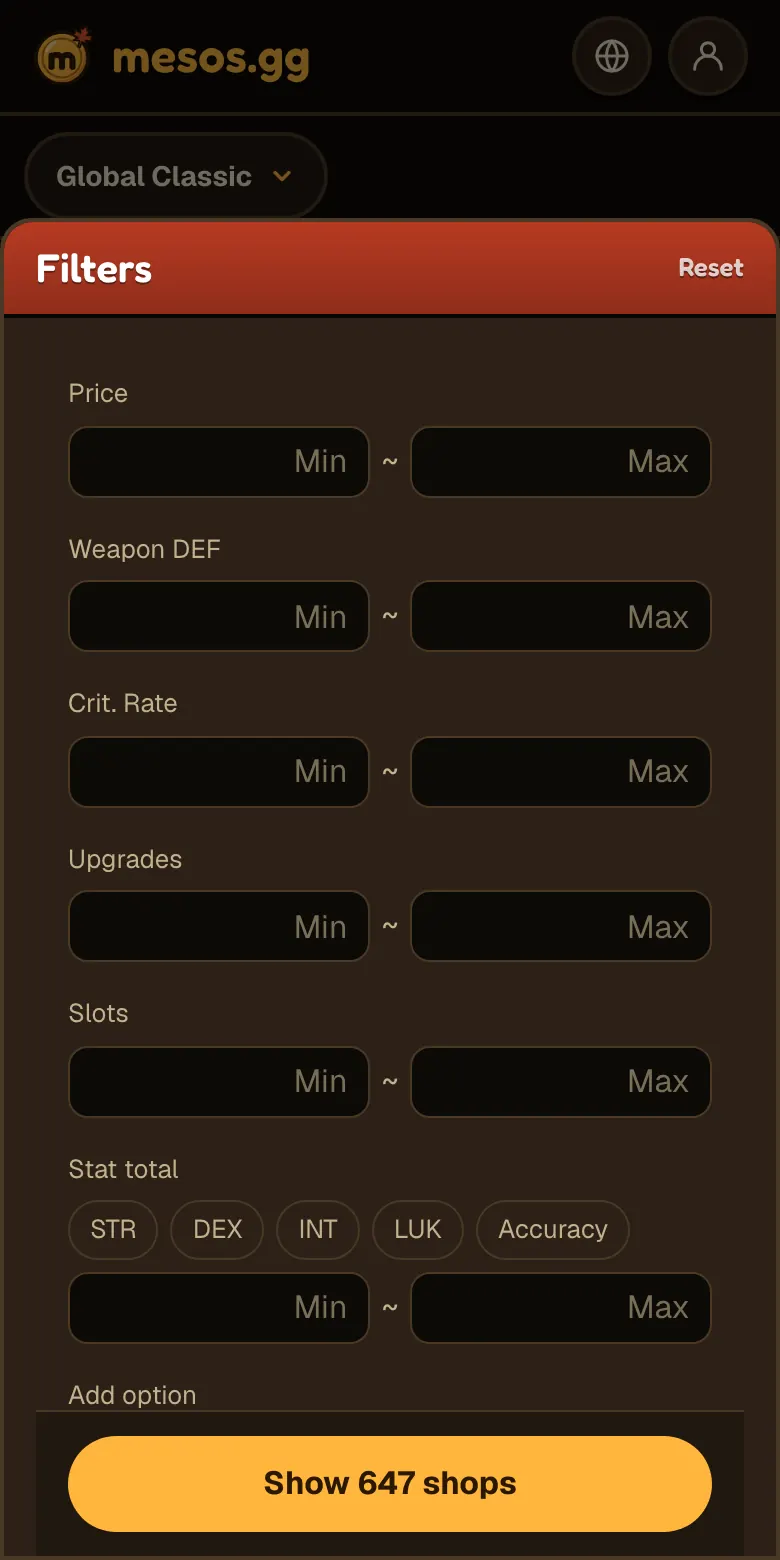
Open Filters on an item page and you get range fields suited to that kind of item. The list updates as you type, and Reset clears it all.
- All items: a price range
- Equipment: the item's own stats, upgrades and slots left
- Armor and accessories: Stat total, which adds up whichever of STR, DEX, INT, LUK and Accuracy you tick
- Equipment: Add option for a stat the item doesn't usually have, and Remove to drop it again
The Work Gloves panel shows Price, Weapon DEF, Crit. Rate, Upgrades, Slots and Stat total, with Add option at the bottom.
Buttons in Stat total set which stats are added together. If you tick LUK and Accuracy and enter 10 in Min, you're left with listings where those two total 10 or more.
The panel stays open to the right of the list on desktop. On a narrow screen, tapping Filters slides a sheet up from the bottom, and Show N shops closes it.
How to use the filters
To find cheap Work Gloves with some Crit. Rate:
- Search the Free Market for Work Gloves to open the item page
- Enter 1 in the Crit. Rate Min field
- Enter your budget in the Price Max field
- Make sure the sort is Price, then go to the channel and room of the first shop
If nothing fits, the list says no shops match these filters. Loosen a range slightly, or press Reset.
The button at the bottom of the sheet on a phone shows how many shops match, so you see the count before closing it. Reset is in the sheet's top right corner.
For gloves nobody has scrolled yet, enter 5 in the Slots Min field, since Work Gloves come with 5 upgrade slots.
For a stat the item doesn't usually have, press Add option, choose the stat and fill in Min.
Sorting and sharing what you see
The list starts out sorted by Price. Buttons at the top right of the shop list switch it to Recent, or to Most upgraded on equipment.
- Price: lowest price each first, with ties going to the most recently seen shop
- Recent: most recently seen shop first
- Most upgraded: most passed scrolls first, with ties going to the cheapest
The address stores your filters and sort. They survive a refresh, and anyone you share the link with gets the same list.
Switching to Recent adds ?sort=recent to the end of the address. Since Price is the default, it leaves the address as it is.
Questions
- How is Stat total calculated? It sums just the stats you tick from STR, DEX, INT, LUK and Accuracy
- When should I use Add option? When you're after a stat that equipment doesn't usually have
- Do stat lines show on the home page? Yes, under each item name in Free Market now
- Do filters stay after a refresh? Yes, since the address stores them
- Why is the chip border gold? That listing has had at least one scroll pass
- Is the price filter just for equipment? No, all item pages have a price range